
Meet SlateSwitch on MPN: How to Connect ChatGPT, Claude, and Copilot Directly to 74+ Marketing Podcasts
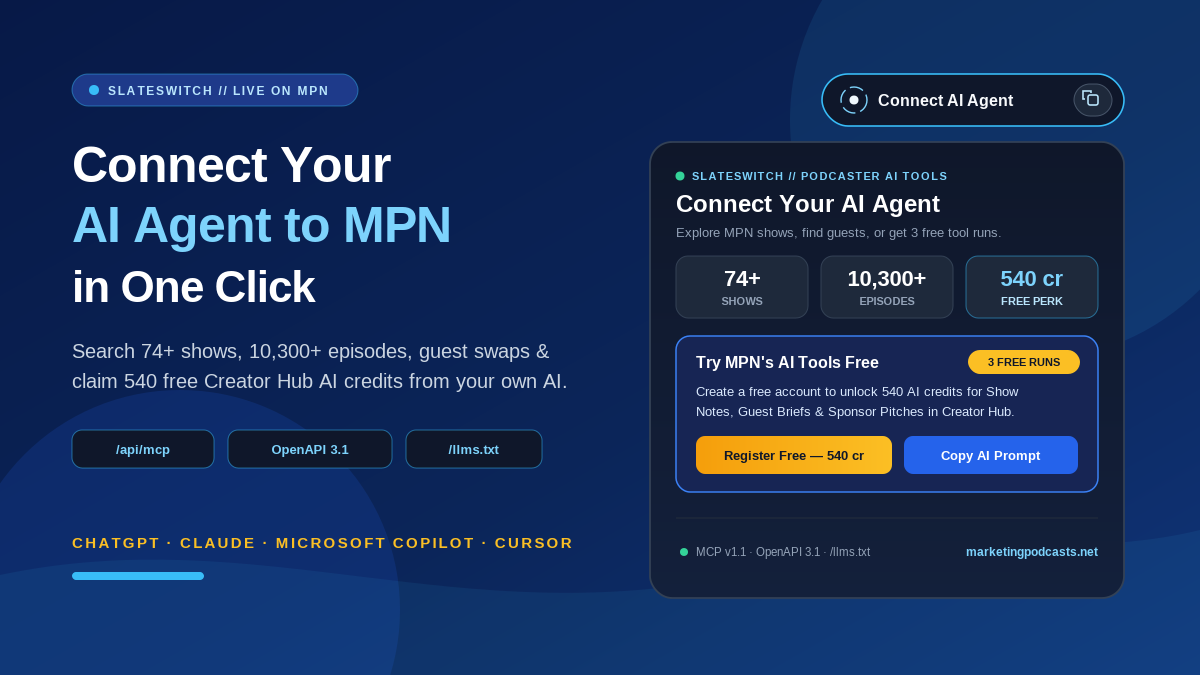
Instead of bolting a walled-off chatbot onto the website, we built SlateSwitch into the top header of marketingpodcasts.net so hosts, listeners, and CMOs can connect ChatGPT, Claude, or Copilot directly to 74+ shows, 10,300+ episodes, and 540 free Creator Hub AI credits.
Share the goodness!
Over the last few months on the Marketing Podcast Network blog, we have been tracking one unmistakable shift in how audiences, guests, and sponsors find podcasts: discovery is moving upstream of the ten blue links.
From connecting your podcast’s social channels to Google Search Console and triggering Google’s red LIVE badge to claiming a verified Google Search Profile at 10,000 followers, every guide has pointed toward the same reality. Marketers, CMOs, PR teams, and prospective sponsors aren’t just typing two-word keywords into a search box anymore—they are asking ChatGPT, Claude, and Microsoft Copilot which shows cover their category, which hosts have tackled a specific problem, and where they should pitch a guest or an ad buy.
Most websites respond to that shift by bolting a walled-off chatbot widget into the bottom-right corner of the screen and hoping visitors type into it.
We took the opposite approach. Instead of asking marketers to leave their daily workflow and talk to our site, we made the entire Marketing Podcast Network plug directly into the AI assistant you already use.
Meet SlateSwitch—now live in the top navigation bar across every page of marketingpodcasts.net.

Whether you are an MPN show host looking for guest-swap partners, a CMO researching real operator viewpoints on B2B attribution, or a brand planning a podcast sponsorship buy, this guide walks through exactly what SlateSwitch does, how each connection mode works under the hood, and how to link your personal MPN account in under two minutes.
What SlateSwitch Actually Does on Marketing Podcast Network
Built on the SlateSwitch agent-readiness framework from All Clear Digital, the MPN SlateSwitch layer turns 74+ independent marketing, communications, and business shows and more than 10,300 published episode pages and tutorials into clean, structured endpoints that AI assistants can read, search, and cite accurately—without scraping messy HTML or guessing URLs.
Clicking Connect AI Agent in the MPN header opens the SlateSwitch Command Drawer:
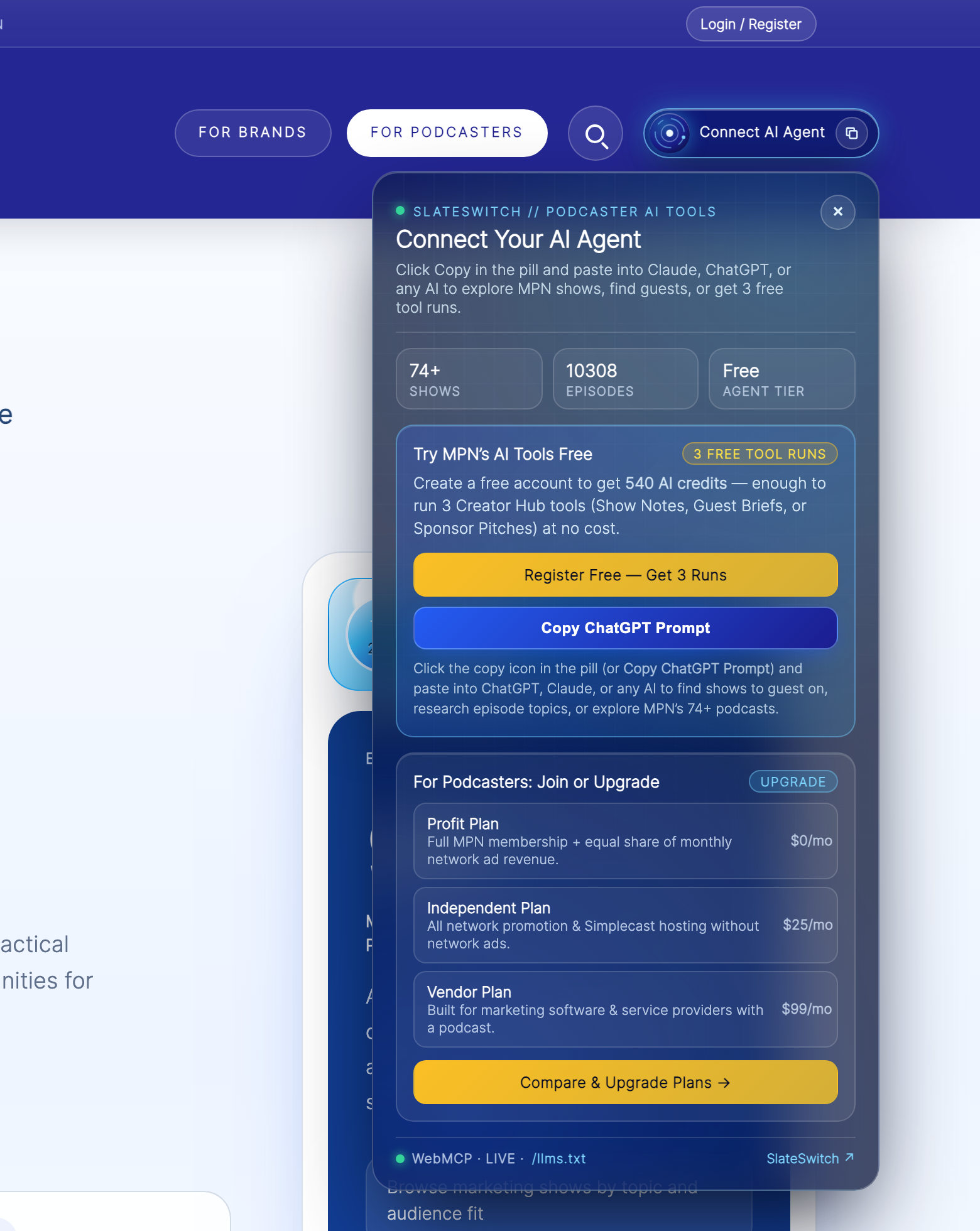
Inside that single drawer, SlateSwitch brings four pieces together:
- One-Click AI Handshake Prompt: Clicking the copy icon on the header pill (or Copy ChatGPT Prompt inside the drawer) copies a ready-to-paste briefing with MPN’s live search endpoints, show directory, OpenAPI spec, and MCP server URL.
- 540 Free Starter AI Credits (3 Creator Hub Runs): Creating or signing into a free account at marketingpodcasts.net/my-account/ lets any podcaster or marketer claim 540 starter credits at zero cost—enough for three full runs in the MPN Creator Hub (Guest Intelligence Briefs, Episode Launch Kits, Show Notes, or Sponsor Pitches).
- Instant Episode Promo & Show Notes Writer (Signed-In Perk): Once signed in, the drawer unlocks a zero-setup Episode Promo & Show Notes Writer right on the page—enter an episode title and takeaway to generate a LinkedIn post, AI-ready episode summary, and valid Schema.org
PodcastEpisodeJSON-LD markup on the spot. - Multi-Protocol Agent Access: Under the surface, SlateSwitch serves three distinct standards—
/llms.txt+ RESTGETsearch, an OpenAPI 3.1 specification, and a live Model Context Protocol (MCP) JSON-RPC server at/api/mcp(plus browser-native WebMCP context when supported).
How It Works: Three Ways to Connect Any AI Assistant
Different marketers use different AI setups. Some live inside a standard ChatGPT or Claude browser tab; others build Custom GPTs or Microsoft Copilot Studio agents for their marketing team; power users run MCP-connected workspaces in Claude or Cursor.
SlateSwitch supports all three without forcing you to write code:
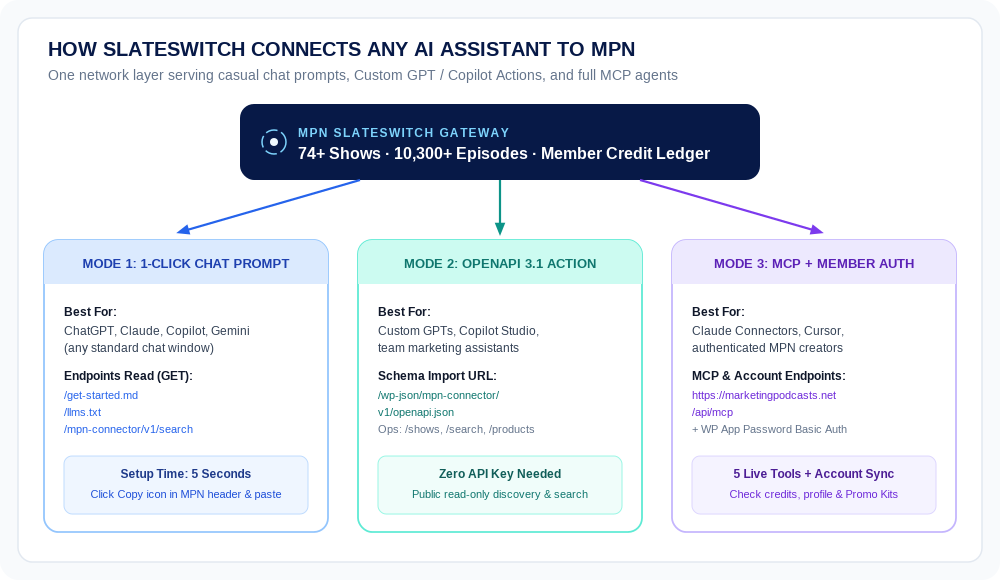
Mode 1: The 5-Second Copy-and-Paste Prompt (ChatGPT, Claude, Copilot, Gemini)
If you just want to ask your everyday AI assistant a question about MPN shows, episodes, or guests right now, no connector configuration is required.
- Look at the top header bar on any page of marketingpodcasts.net.
- Click the small copy icon on the right side of the Connect AI Agent button (or open the drawer and click Copy ChatGPT Prompt). The pill flashes Prompt Copied! to confirm.
- Paste straight into ChatGPT, Claude, Microsoft Copilot, Perplexity, or Gemini (with web access enabled) and add your question.
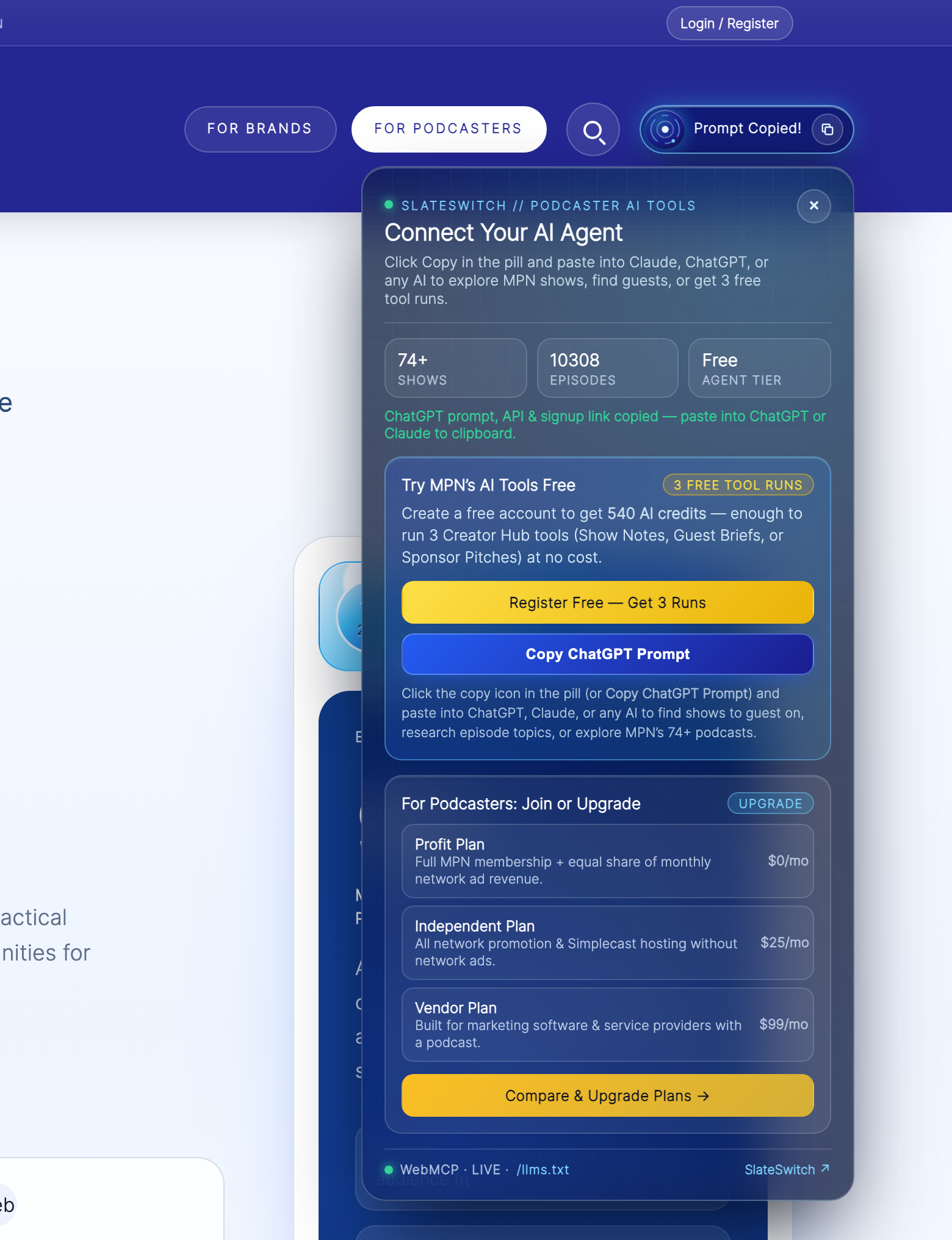
GET endpoints, show directory, OpenAPI schema, and MCP server URL directly to your clipboard.Because browser-based chat assistants fetch web data via read-only GET requests, the copied prompt points your AI straight at MPN’s clean markdown and JSON discovery routes—including /llms.txt, /get-started.md, and /wp-json/mpn-connector/v1/search?query=....
Five high-value prompts you can run immediately after pasting:
- For MPN Hosts (Guest-Swap Matching): “My podcast covers B2B content strategy for SaaS founders. Search the MPN show directory and recommend 5 fellow MPN hosts whose audiences complement mine without overlapping directly, plus a concrete cross-guest topic for each.”
- For CMOs & Marketing Leaders (Topic Briefings): “Search recent Marketing Podcast Network episodes about AI search visibility, LinkedIn reach, and B2B attribution. Summarize the strongest operator takeaways and link me to the exact episodes to listen to.”
- For Prospective Podcast Guests: “I’m an agency founder with new data on creator partnerships. Which MPN shows interview external guests on influencer and creator marketing, and what angles fit their recent episodes?”
- For Sponsors & Media Buyers: “Identify the MPN podcasts best suited for a B2B marketing analytics sponsor and group them into a 4-show test flight by audience focus.”
- For Episode Research: “Check what MPN shows have already published on press releases and AI visibility this month so my next episode brings a fresh angle.”
Mode 2: OpenAPI 3.1 Action (Custom GPTs & Microsoft Copilot Studio)
If you maintain a reusable Custom GPT for your show production team or a Microsoft Copilot Studio agent for your marketing department, you can wire MPN in permanently using our public OpenAPI 3.1 specification (documented at marketingpodcasts.net/connector/):
- OpenAPI 3.1 Schema URL:
https://marketingpodcasts.net/wp-json/mpn-connector/v1/openapi.json - API Base URL:
https://marketingpodcasts.net/wp-json/mpn-connector/v1 - Authentication: None required (public, read-only discovery)
Importing that single URL gives your Custom GPT or Copilot agent four structured operations out of the box:
getConnectorStatus(GET /status) — Live capability and version check.listPodcastShows(GET /shows?search=&per_page=) — Paginated, searchable roster of MPN podcasts.searchPodcastContent(GET /search?query=) — Full-text search across episodes, tutorials, shows, and tools.listPublicProducts(GET /products) — Public MPN Creator Hub tools and credit requirements.
Mode 3: Native Model Context Protocol (MCP) Server (Claude, Cursor & Agent Frameworks)
For marketers, founders, and developers running native MCP clients—such as Claude’s custom MCP integrations, Claude Desktop, Cursor, or custom agent runners—MPN hosts a live Streamable HTTP JSON-RPC MCP server directly on our domain:
- MCP Endpoint URL:
https://marketingpodcasts.net/api/mcp - Discovery Manifest:
https://marketingpodcasts.net/.well-known/mcp.json - Supported Protocol Versions:
2024-11-05and2025-03-26
Once connected, your MCP agent automatically discovers five callable tools and two live documentation resources:
| MCP Tool / Resource | What It Returns | Auth Required? |
|---|---|---|
search_shows |
Filters MPN’s 74+ shows by keyword, returning show name, URL, episode count, and summary. | No |
search_content |
Searches 10,300+ published episodes and MPN blog tutorials by topic, guest, or keyword with excerpts and permalinks. | No |
list_latest_episodes |
Pulls the newest episodes and articles published across the entire network. | No |
get_membership_plans |
Returns Profit ($0/mo), Independent ($25/mo), and Vendor ($99/mo) plan details plus the 540-credit signup perk. |
No |
get_my_account |
Returns your connected MPN member profile, show name, RSS feed, plan tier, and live AI credit balance. | Optional (WP App Password) |
Step-by-Step: Claim Your 540 Free AI Credits & Link Your MPN Member Account
Even if your podcast is already part of MPN—or if you’re an independent host or marketer reading our tutorials—make sure you have created your free site login on marketingpodcasts.net/my-account/ so you can claim your starter credits and connect your account.
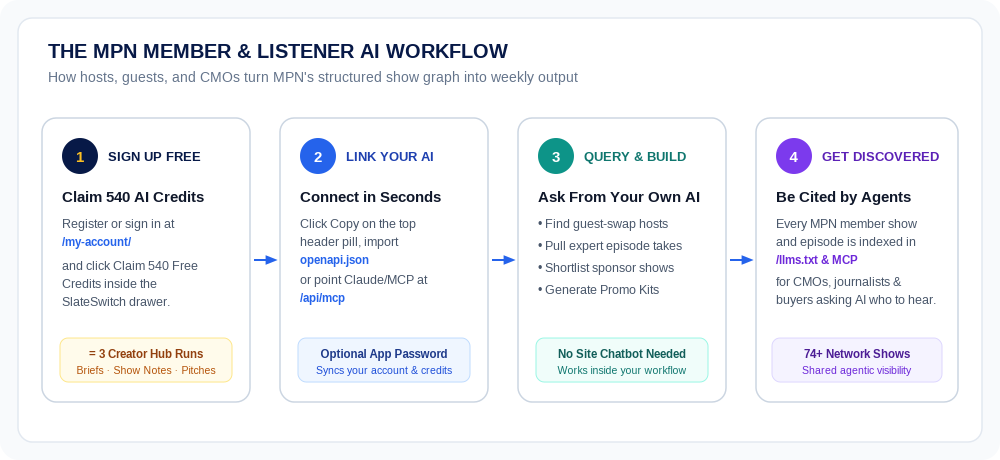
- Create or Log In to Your Free MPN Account: Visit marketingpodcasts.net/my-account/ and register (or sign in if you already have a member login).
- Claim Your 540 Free Starter Credits: Click Connect AI Agent in the top header and click the gold Claim 540 Free Credits (3 Runs) button. Your header pill immediately updates to display your live credit balance (for example,
Podcaster Agent · 540 cr), and the built-in Episode Promo & Show Notes Writer unlocks right inside the drawer. - Run Creator Hub Tools or Generate Promo Kits: Use your 540 credits inside the Creator Hub for Guest Intelligence Briefs, Episode Launch Kits, Speaker One-Sheets, or Sponsor Pitch Builders—and use the drawer’s free Episode Promo Writer every time a new episode drops.
- Optional — Authenticate Your External AI Agent to Your Account: Want your external MCP client or custom agent to read your MPN profile, credit balance, and generate Episode Promo Kits directly? While logged in, visit marketingpodcasts.net/wp-admin/authorize-application.php (or open Users → Profile → Application Passwords), generate an Application Password named after your agent, and pass it via standard HTTP Basic Auth (
email:application_password) to/api/mcpor/wp-json/mpn-tools/v1/me. (Tip for Python builders: set a descriptive header such asUser-Agent: MPN-Agent/1.0rather than defaultpython-requestsso Cloudflare security rules allowPOSTrequests cleanly.)
Why This Matters for Every MPN Host’s Discoverability
SlateSwitch isn’t just a utility for the person asking the AI a question—it is a distribution upgrade for every host on the Marketing Podcast Network roster.
When a CMO, conference organizer, journalist, or sponsor connects their AI to MPN and asks “Which podcasts are talking smartly about B2B brand positioning or AI content operations right now?”, the connector searches the actual titles, show descriptions, and episode notes published on marketingpodcasts.net.
To make sure your show surfaces first whenever an AI agent queries the network:
- Write Specific, Topic-Rich Episode Titles & Show Notes: Name your guests, their companies, and the concrete marketing problem solved in the first two sentences of your show notes so
search_contentand/wp-json/mpn-connector/v1/searchmatch natural-language prompts accurately. - Keep Your Show Profile Complete in the Creator Hub: Log in at /my-account/ and verify your show name, RSS feed, and host links in the Creator Hub.
- Connect the Rest of Your Entity Graph: Pair your MPN show page with a self-updating OneFront RSS hub (see our link automation guide) and claim your Google Search Profile once any social channel crosses 10,000 followers.
Quick-Reference Directory: Live MPN Agent Endpoints
| Surface | Live URL | Purpose |
|---|---|---|
| Agent Quickstart | /get-started.md |
Plain-markdown onboarding sheet for humans and AI assistants. |
| AI Show Directory | /llms.txt |
Complete AI-readable index of MPN shows, episode counts, and links. |
| MCP Server | /api/mcp |
Streamable HTTP JSON-RPC Model Context Protocol endpoint (v1.1.0). |
| OpenAPI 3.1 Spec | /wp-json/mpn-connector/v1/openapi.json |
Drop-in schema for Custom GPT Actions & Microsoft Copilot Studio. |
| Agent Gate JSON | /.well-known/agent-gate.json |
Machine-readable discovery manifest of network stats, plans, and routes. |
| Member Signup & Credits | /my-account/ |
Free registration + 540 starter AI credits (3 Creator Hub tool runs). |
Ready to try it? Scroll to the top of this page, click Connect AI Agent, claim your 540 free AI credits at marketingpodcasts.net/my-account/, and put the entire Marketing Podcast Network inside your daily AI workflow. And if you host a marketing, business, or communications podcast that isn’t in the network yet, compare our Profit ($0/mo), Independent ($25/mo), and Vendor ($99/mo) plans here.